SPF, DKIM and DMARC Explained: The Three DNS Records Behind Email Delivery
SPF, DKIM and DMARC Explained: The Three DNS Records Behind Email Delivery
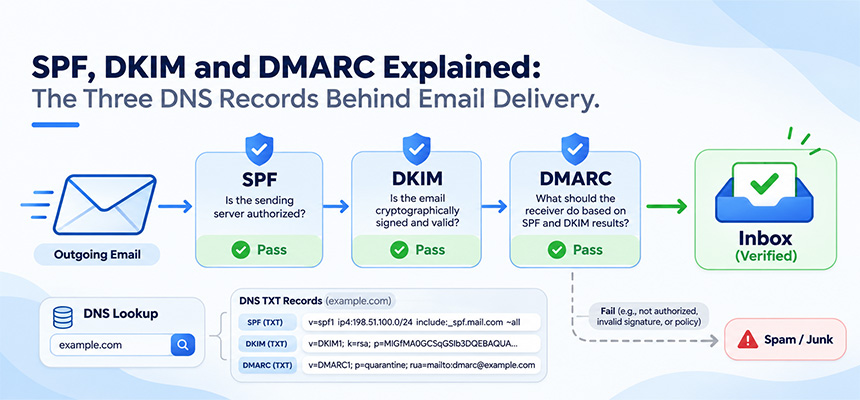
If emails from your domain land in spam, or are rejected outright, the cause is very often in DNS rather than in the message itself. Mailbox providers decide whether to trust a message partly by checking three records published in your domain’s DNS: SPF, DKIM and DMARC.
All three are ordinary TXT records, so anyone can look them up. This guide explains what each one does, what a correct record looks like, and the mistakes that most often break them.
Why these records matter now
Email was designed without any way to prove who sent a message. Anyone can put your domain in the From line. SPF, DKIM and DMARC were added later to close that gap, and the large mailbox providers now require them.
Since February 2024, Gmail requires every sender to authenticate with SPF or DKIM. Senders of 5,000 or more messages a day to Gmail accounts must use both, and must also publish a DMARC record, where a policy of p=none is enough. The From domain must also align with the domain that passed SPF or DKIM. Yahoo introduced matching rules at the same time, and Microsoft applied similar requirements to Outlook.com in May 2025.
Even if you send far fewer messages, setting up all three is the simplest way to improve inbox placement and to stop others from spoofing your domain.
SPF: which servers may send for your domain
SPF (Sender Policy Framework) is a list of the servers allowed to send email for your domain. The receiving server checks whether the message came from one of them.
It is published as a single TXT record on the domain itself, for example:
example.com. TXT "v=spf1 include:_spf.google.com include:sendgrid.net -all"
Each include: adds a service’s sending servers, here Google Workspace and SendGrid. The ending sets the rule for everything else: -all means other servers should fail, and ~all means they should soft-fail, which is treated as suspicious rather than rejected.
Three mistakes cause most SPF failures:
- More than one SPF record. A domain may have only one TXT record starting with
v=spf1. When you add a new email service, merge itsinclude:into the existing record instead of creating a second one. Two records make SPF fail completely. - Too many DNS lookups. The SPF standard (RFC 7208) allows at most 10 DNS lookups while checking a record. Every
include:counts, and so do the includes nested inside it. Domains that use many services can quietly pass this limit, and SPF then returns an error. - A forgotten sender. Your CRM, helpdesk, invoicing tool or website contact form may send mail as your domain. If it is not in the record, its messages fail SPF.
DKIM: a signature that proves the message was not altered
DKIM (DomainKeys Identified Mail) adds a cryptographic signature to each outgoing message. The sending service signs with a private key, and you publish the matching public key in DNS so receivers can verify it.
The public key lives at a name made of a selector, _domainkey, and your domain:
google._domainkey.example.com. TXT "v=DKIM1; k=rsa; p=MIIBIjANBgkqh..."
The selector (google in this example) is chosen by the sending service, which lets one domain hold several keys, one per service. Your email provider gives you the exact name and value to publish; you do not write the key yourself.
Unlike SPF, a DKIM signature survives forwarding, because it travels inside the message. That makes DKIM the more reliable of the two for passing DMARC. Common problems are a key copied with missing characters, a record created under the wrong selector, or a provider where DKIM signing was never switched on after the record was published.
DMARC: the policy that ties them together
SPF and DKIM each check something, but neither says what a receiver should do when a check fails, and neither on its own checks the From address people actually see. DMARC (Domain-based Message Authentication, Reporting and Conformance) adds both.
A message passes DMARC when SPF or DKIM passes and the domain that passed matches the domain in the From line. This matching is called alignment. A message can pass SPF for a mailing service’s domain and still fail DMARC, because that domain is not yours.
DMARC is a TXT record at _dmarc under your domain:
_dmarc.example.com. TXT "v=DMARC1; p=none; rua=mailto:[email protected]"
The p= tag sets the policy for messages that fail:
| Policy | What receivers do with failing mail | When to use it |
|---|---|---|
p=none |
Deliver normally, but send you reports | Starting out, while you find every service that sends as your domain |
p=quarantine |
Treat as suspicious, usually the spam folder | Once reports show your legitimate mail passing |
p=reject |
Refuse the message | Full protection against spoofing of your domain |
The rua= address receives daily aggregate reports listing which servers sent mail as your domain and whether it passed. Reading these reports before tightening the policy is the safest path, because they reveal senders you may have forgotten about. Moving straight to p=reject without them is a common way to block your own invoices or password-reset emails.
How the three work together
- The receiving server reads the From domain of the message.
- It checks SPF against the server that delivered the message.
- It verifies any DKIM signature using the public key in your DNS.
- It looks up your DMARC record and checks whether at least one passing result aligns with the From domain.
- If neither aligns, it applies your DMARC policy: deliver, quarantine or reject.
How to check your records
You can confirm all three with the DomainScan DNS lookup tool by choosing the TXT record type:
- Look up TXT records for your domain, for example
example.com. Find the record beginning withv=spf1and confirm there is exactly one. - Look up TXT for
_dmarc.example.com. You should see one record beginning withv=DMARC1. - Look up TXT for your DKIM name, such as
google._domainkey.example.com. Your email provider’s setup page shows the selector to use. - If a record does not appear, check that it was added at the DNS provider your domain actually uses, then allow for the record’s TTL before checking again.
To see the result for a real message, send an email to a Gmail address, open it, and choose Show original. Gmail lists whether SPF, DKIM and DMARC passed for that message.
A sensible order to set things up
Start by listing every service that sends email as your domain. Add them all to a single SPF record, enable DKIM in each service that supports it, and publish DMARC at p=none with a reporting address. After a few weeks of clean reports, move to p=quarantine, and later to p=reject.
If you use a domain only for a website and never send email from it, publish v=spf1 -all and a DMARC record with p=reject. This tells receivers that any mail claiming to come from that domain is fake.