How Does IP Geolocation Work and How Accurate Is It?
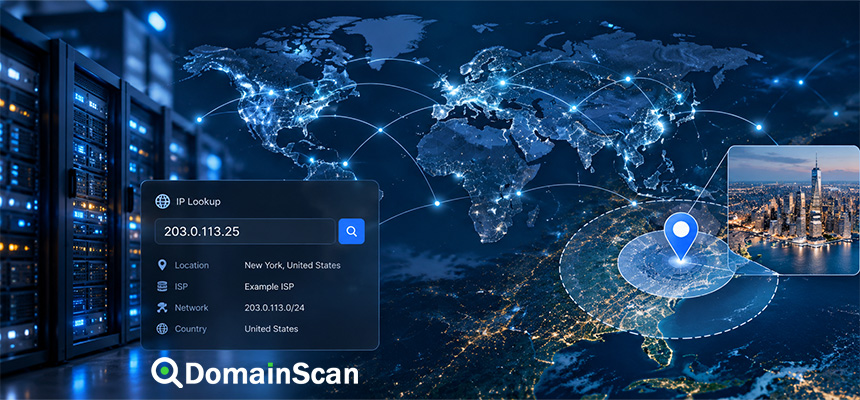
IP geolocation is the process of estimating the geographic location associated with an IP address.
For example, an IP lookup may return information such as:
IP Address: 203.0.113.25
Country: Singapore
Region: Central Singapore
City: Singapore
Network: Example ISP
ASN: AS64500
This information can be useful for network analysis, localization, security monitoring, analytics, and troubleshooting.
However, IP geolocation should not be confused with GPS.
An IP address does not normally reveal an exact street address, apartment number, or precise physical location.
The result is an estimate based on network information and geolocation databases.
What Is IP Geolocation?
IP geolocation is the process of mapping an internet address to approximate geographic and network information.
A lookup may provide:
- Country
- Region or state
- City
- Time zone
- Internet service provider
- Autonomous System Number
- Organization or network name
The exact fields depend on the data provider and the information available for the address.
Does an IP Address Contain Location Information?
No.
An IP address does not contain a city or country code inside it in the same way a telephone number may contain a country prefix.
For example:
203.0.113.25
does not itself encode:
Singapore
Johor Bahru
London
New York
The geographic result comes from databases that associate IP ranges with network and location information.
How Does IP Geolocation Work?
IP geolocation providers build databases using multiple sources.
These can include:
- Internet registry allocation records
- Routing data
- ISP information
- Network measurements
- Commercial data sources
- Previously observed device or network behavior
- User-contributed location information in some datasets
The provider then estimates where a particular IP range is likely to be used.
What Is an IP Range?
Internet addresses are allocated in blocks rather than one address at a time.
For example:
203.0.113.0/24
represents a range of IPv4 addresses.
A network operator may receive or announce a range and use its addresses across:
- Customers
- Data centers
- Mobile users
- Enterprise networks
- Cloud infrastructure
Geolocation systems often make assumptions at the range level.
What Is an Autonomous System Number?
An Autonomous System Number, or ASN, identifies a network participating in internet routing.
For example:
AS64500
may represent:
- An ISP
- A cloud provider
- A CDN
- A large enterprise
- A hosting company
ASN information can provide useful network context even when geographic location is uncertain.
IP Geolocation vs IP WHOIS
These are related but different.
IP WHOIS or registry data
Provides information about the organization or network to which an IP range is allocated.
For example:
Network:
203.0.113.0/24

Organization:
Example Network Company
IP geolocation
Attempts to estimate where an IP address is being used geographically.
The organization receiving the IP range may be located in one country while the actual users are distributed across many regions.
IP Geolocation vs GPS
GPS can provide precise device location using satellite signals and device hardware.
IP geolocation works differently.
A simplified comparison is:
GPS:
Device-level physical positioning

IP Geolocation:
Network-level location estimate
GPS can sometimes locate a device within meters.
IP geolocation may only reliably identify the country or general region.
Can an IP Address Reveal Your Exact Location?
Usually not.
A public IP lookup generally cannot determine:
- Your home address
- Your apartment number
- Your exact GPS coordinates
- Your current room or building
It may estimate a city, region, or network location.
That estimate can also be wrong.
Why Does IP Location Sometimes Show the Wrong City?
Several factors can cause incorrect city-level results.
An ISP may route many customers through centralized infrastructure.
For example:
User location:
City A

ISP gateway:
City B

Geolocation database:
City B
The database associates the public IP with the ISP gateway rather than the user's physical location.
Why Does My IP Show a Different State or Region?
Internet traffic does not always exit the provider's network near the user.
An ISP may allocate addresses centrally and route traffic through another region.
Possible reasons include:
- Centralized network gateways
- Regional routing design
- Address-pool management
- Carrier-grade NAT
- Outdated geolocation databases
Why Does My IP Location Change?
Many users do not have permanently assigned public IP addresses.
An ISP may give you a different address after:
- Router reconnect
- Network reset
- Mobile handover
- Lease expiration
- ISP network changes
The new IP may have a different geolocation record.
Static IP vs Dynamic IP
Static IP
A static IP remains assigned to a customer or system for a long period.
Dynamic IP
A dynamic IP can change over time.
Dynamic residential and mobile networks are more likely to produce changing location results.
How Accurate Is IP Geolocation?
Accuracy depends on what level of location you are asking for.
Country-level accuracy is generally much better than exact city-level accuracy.
A simplified interpretation is:
Country:
Often relatively reliable

Region:
Usually useful but not guaranteed

City:
Can be approximate or incorrect

Exact address:
Not reliably available from IP alone
Different geolocation providers can also return different answers for the same address.
Why Do Different IP Location Websites Show Different Results?
Each service may use a different database and update schedule.
For example:
Provider A:
Kuala Lumpur

Provider B:
Johor Bahru

Provider C:
Singapore
for the same IP address.
This does not necessarily mean one service is malfunctioning.
They may have different evidence and update histories.
How Often Do IP Geolocation Databases Change?
IP address usage changes continuously.
Networks:
- Acquire new address ranges
- Transfer IP space
- Change routing
- Open new data centers
- Reassign addresses
Geolocation providers must update their databases to reflect these changes.
A stale database can continue showing an old location after the network has moved.
What Happens When an IP Range Is Sold or Transferred?
Suppose an address block was previously used in Country A.
It is later transferred to a network in Country B.
For some time, certain databases may still show:
Country A
while others have already updated to:
Country B
This is one common source of inconsistent geolocation results.
How VPNs Affect IP Geolocation
A VPN changes the public IP address seen by websites.
A simplified connection looks like:
User
  ↓
VPN Tunnel
  ↓
VPN Server
  ↓
Website
The website sees the VPN server's public IP rather than the user's normal ISP address.
IP geolocation therefore reflects the VPN server location.
Can a VPN Make You Appear to Be in Another Country?
Yes.
If the VPN exit server is located in another country, websites using IP geolocation may identify the connection with that country.
For example:
User:
Malaysia

VPN Server:
Japan

Website sees:
Japanese IP address
Does a VPN Hide Your Exact Physical Location?
A VPN changes the IP address visible to remote websites.
However, websites or applications may have access to other location signals if the user grants them.
Examples include:
- Browser geolocation permission
- GPS
- Wi-Fi location data
- Account information
IP geolocation is only one location signal.
Proxy Servers and IP Location
A proxy can have a similar effect.
The destination may see:
Proxy IP
instead of:
User IP
Depending on the proxy design and application protocol, additional headers may still contain network information.
Tor and IP Geolocation
When traffic uses Tor, websites normally see the IP address of the Tor exit relay.
Geolocation therefore corresponds to the exit relay rather than the user's physical location.
The exit location can also change.
Mobile Networks and IP Geolocation
Mobile networks are especially difficult to geolocate precisely.
Thousands of users may share centralized network infrastructure.
A mobile user's traffic can exit the carrier network far from the device.
For example:
Phone:
Johor

Carrier gateway:
Kuala Lumpur
An IP database may report Kuala Lumpur.
What Is Carrier-Grade NAT?
Carrier-grade NAT, or CGNAT, allows many customers to share one public IPv4 address.
A simplified structure is:
User A
User B
User C
User D
   ↓
Carrier NAT
   ↓
One public IP
This is common with:
- Mobile operators
- Residential ISPs
- Large access networks
IP geolocation cannot distinguish the precise physical locations of all customers sharing the same public address.
Residential Broadband and IP Location
Residential broadband addresses may be assigned from regional pools.
A customer's public IP might be associated with:
- The nearest ISP hub
- A regional office
- A network gateway
- A database default location
The result does not necessarily represent the customer's home address.
Business Internet Connections
Enterprise IP blocks can sometimes be easier to associate with a company or region because they may have more stable addressing.
However, large corporations often operate global networks.
A range registered to headquarters does not prove that a device using the range is physically located there.
Cloud Servers and IP Geolocation
Cloud IP addresses often correspond to a data center or cloud region.
For example:
Website server IP
    ↓
Cloud region
    ↓
Approximate data center location
This can be useful when analyzing hosting infrastructure.
However, the registered organization may be headquartered somewhere else.
CDNs and IP Geolocation
A CDN can use the same domain across many edge locations.
For example:
example.com
   ↓
CDN
   ↓
Singapore edge
Tokyo edge
Frankfurt edge
New York edge
The IP returned to one user may be different from the address returned to another.
Why a Domain's IP Location Can Change by Country
Geo-distributed DNS and CDNs can intentionally return different addresses.
For example:
User in Malaysia:
example.com → Singapore CDN IP

User in Germany:
example.com → Frankfurt CDN IP
Both users are accessing the same website.
The IP geolocation reflects the local edge server, not the website owner's location.
Anycast and IP Location
Anycast allows the same IP address to be advertised from many physical locations.
This is commonly used by:
- CDNs
- DNS providers
- DDoS protection networks
For example:
One IP address
   |
   +-- Singapore
   +-- Tokyo
   +-- London
   +-- New York
A traditional geolocation database may assign the address to only one location even though it is served globally.
Can IP Geolocation Locate a Domain Owner?
No.
The location of a web server is not the same as the location of the domain registrant or business owner.
For example:
Company:
Malaysia

Website hosting:
Singapore

Registrar:
United States

CDN:
Global
All of these locations can differ.
Domain Location vs Company Location
A domain may be hosted in another country for:
- Lower latency
- Cloud availability
- Cost
- Security
- CDN architecture
Do not use server location alone to determine where a company operates.
Can IP Geolocation Identify the Domain Registrar?
No.
The registrar is part of domain registration infrastructure.
IP geolocation describes network location.
Use Domain Whois or RDAP when investigating registration information.
IP Geolocation vs Reverse IP Lookup
IP Geolocation
Asks:
Where is this IP approximately located?
Reverse IP Lookup
Asks:
Which domains are associated with this IP?
The two tools provide different types of network context.
IP Geolocation vs Reverse DNS
Reverse DNS queries the PTR record associated with an IP.
For example:
203.0.113.25
    ↓ PTR
server.example.net
IP geolocation instead estimates the network's geographic location.
Can PTR Records Improve IP Location Accuracy?
A PTR hostname may contain useful hints.
For example:
server-sg.example.net
could suggest Singapore.
However, hostname labels are not authoritative geographic evidence.
They can be outdated, arbitrary, or misleading.
How Websites Use IP Geolocation
Common uses include:
- Language selection
- Regional content
- Currency selection
- Fraud detection
- Security monitoring
- Analytics
- Regional compliance workflows
IP Geolocation for Language Selection
A website may estimate the country and initially display a local language.
For example:
IP detected:
France

Default language:
French
The user should ideally still be able to change the language manually because the geolocation may be wrong.
IP Geolocation for Currency
E-commerce sites may use IP location to suggest:
USD
EUR
MYR
SGD
based on the visitor's estimated country.
This is a convenience feature rather than proof of the user's billing location.
IP Geolocation for Security
Security systems can use location as one signal.
For example:
Normal login:
Malaysia

New login:
Another region
The system may request additional verification.
However, VPNs, travel, mobile networks, and inaccurate databases can produce false alerts.
IP Geolocation Should Not Be Used Alone for Authentication
An IP location is not proof of identity.
A user's address can change because of:
- VPN use
- Travel
- Mobile carrier routing
- ISP changes
- Corporate networks
Security systems should combine IP information with other signals.
Can IP Geolocation Detect Fraud?
It can contribute to fraud detection.
For example, a system might compare:
Account country:
Malaysia

IP location:
Europe

Payment country:
Singapore
This inconsistency may justify additional checks.
It does not prove fraud by itself.
IP Geolocation and Privacy
IP addresses are network identifiers and can be used as part of online activity analysis.
The privacy and legal treatment of IP data varies by jurisdiction and context.
Applications using IP geolocation should collect and retain information only where appropriate and follow applicable privacy requirements.
Can Someone Track You With Only Your IP?
An IP address can provide network and approximate location information.
It usually does not directly reveal an exact physical address to ordinary users.
Network providers may have more detailed subscriber records, but access to such information is separate from a public IP lookup.
Can IP Geolocation Identify a Person?
Not reliably by itself.
One public address may represent:
- An entire household
- A company
- A mobile carrier gateway
- A hotel
- A university
- Thousands of CGNAT users
IP geolocation should therefore be understood as network-location data, not personal identity.
Why Hotels and Public Wi-Fi Cause Location Confusion
Many users can share one public connection.
For example:
Hotel guests
   ↓
Hotel network
   ↓
One public IP
The location may correspond to the hotel's ISP connection rather than each user's precise position.
Satellite Internet and IP Geolocation
Satellite networks can make traditional geolocation difficult.
Traffic may enter the terrestrial internet through a gateway located far from the user.
The public IP may therefore geolocate to the gateway rather than the satellite terminal.
Corporate VPNs and IP Geolocation
An employee working remotely may connect through a company VPN.
For example:
Employee:
Malaysia

Corporate VPN:
Singapore

Website sees:
Singapore IP
This is normal behavior.
IPv6 and IP Geolocation
IPv6 addresses can also be geolocated.
However, IPv6 allocation and network design differ from IPv4.
A device may receive a much larger address prefix, and addresses may change for privacy reasons.
IPv4 vs IPv6 Location Results
A user may have:
IPv4:
Malaysia

IPv6:
Singapore
according to different databases.
This can happen if the ISP routes the two protocols differently or if database information is inconsistent.
What Is a Hosting IP?
A hosting IP belongs to infrastructure used for websites, applications, or cloud servers.
These addresses are often easier to associate with a data center or cloud region than residential addresses.
For example:
IP:
203.0.113.50

Network:
Cloud Provider

Location:
Singapore data center
Hosting Location vs Visitor Location
These should not be confused.
A server may be located in Singapore while most of its visitors are in Europe.
Domain Location tools describe the server or network address being queried, not the people using the website.
Can IP Location Tell Which Data Center Is Used?
Sometimes approximately.
If a cloud or hosting provider assigns addresses by region, the IP may provide a useful clue.
However, the result may show only the provider's registered city or organization rather than the exact facility.
Why Hosting Providers Sometimes Show the Wrong Country
An IP block may have been registered to a company's headquarters while being used in another country.
For example:
Company headquarters:
United States

IP usage:
Singapore data center
Registry information and geolocation data may therefore disagree.
How to Check an IP Location
Start with the IP address.
For example:
203.0.113.25
Use DomainScan Domain Location to retrieve available network and geolocation information.
Then interpret the result as an estimate rather than an exact physical location.
How to Find a Domain's IP Before Checking Location
If you start with:
example.com
use DNS Lookup to find:
A
AAAA
records.
For example:
example.com → 203.0.113.25
You can then investigate the address.
What If a Domain Has Multiple IP Addresses?
A hostname can return several addresses.
For example:
example.com

203.0.113.10
203.0.113.11
203.0.113.12
Each address may have a different geolocation.
This is common with:
- Load balancing
- CDNs
- Multi-region hosting
What If DNS Returns Different IPs in Different Countries?
This often indicates geo-distributed infrastructure.
For example:
Asia:
example.com → 203.0.113.20

Europe:
example.com → 198.51.100.30
The website may intentionally route users to nearby servers.
How Reverse IP Lookup Helps With Location Analysis
After identifying the IP, Reverse IP Lookup can show other domains associated with the same address.
This can help determine whether the address appears to be:
- Shared hosting
- A CDN edge
- A dedicated server
How WHOIS Helps With IP Location Analysis
IP registry data can identify the network operator or organization receiving the address range.
This can provide context when a geolocation result seems unusual.
Remember that registration location and actual network usage location can differ.
How Blocklist Lookup Helps With IP Analysis
Blocklist Lookup provides reputation information rather than geographic information.
For example:
Location:
Singapore

Blocklist:
Listed
These are separate characteristics of the IP.
Common IP Geolocation Mistakes
Assuming the city is exact
City-level results are estimates.
Assuming a server location is the owner's location
Websites can be hosted anywhere.
Assuming VPN users are physically in the VPN country
The result reflects the VPN exit server.
Assuming one database is always correct
Providers can disagree.
Assuming an ISP headquarters is the user's location
Network registration details can reflect corporate addresses.
Assuming an IP identifies one person
Shared networks and CGNAT make this unreliable.
Example: Residential ISP
A user is physically located in:
Johor Bahru
Their ISP routes traffic through:
Kuala Lumpur
A geolocation database returns:
Kuala Lumpur
The result is reasonable from a network perspective but not the user's exact physical location.
Example: VPN User
User:
Malaysia
VPN exit:
Germany
IP lookup:
Germany
The geolocation tool is reporting the visible network endpoint.
Example: CDN Website
A website owner is based in:
Australia
The visitor receives a CDN address in:
Singapore
Domain Location reports Singapore.
This does not imply that the company is located there.
Example: Mobile Carrier
A phone user travels from one city to another while keeping the same mobile session.
The public IP may continue to geolocate to a centralized carrier gateway.
The result can remain unchanged even though the device has moved hundreds of kilometers.
Example: Recently Reassigned IP Range
An IP range previously belonged to a provider in Europe.
It is reassigned to a network in Asia.
One geolocation provider updates immediately while another takes longer.
The same address temporarily appears in two different countries depending on the lookup service.
How to Interpret IP Geolocation Responsibly
A practical approach is:
- Treat country-level data as an estimate.
- Treat city-level data more cautiously.
- Check the ISP or network organization.
- Check the ASN.
- Consider VPN or proxy use.
- Consider mobile and CGNAT networks.
- Check whether the IP belongs to a CDN.
- Compare additional data when the result matters.
When Is IP Geolocation Most Useful?
It is most useful when approximate network location is sufficient.
Examples include:
- Regional analytics
- Localization
- Network troubleshooting
- Server location research
- Fraud risk signals
- Traffic analysis
When Should You Not Rely on IP Geolocation?
Do not use it as the only source for decisions requiring exact physical location.
Examples include:
- Exact delivery address
- Precise emergency location
- Proof that someone was physically in a city
- Identity verification
IP information alone is not precise enough for these purposes.
How DomainScan Can Help
Domain Location
Use DomainScan Domain Location to inspect available IP geolocation and network information.
DNS Lookup
Use DNS Lookup to find the current A and AAAA records for a hostname before investigating the IP.
Reverse IP Lookup
Use Reverse IP Lookup to see domains associated with the same network address.
Domain Whois
Use Domain Whois when you need domain registration context rather than server location.
Blocklist Lookup
Use Blocklist Lookup to investigate IP reputation separately from geographic location.
Open Ports Lookup
Use Open Ports Lookup to check publicly reachable network services on the address.
A Practical IP Geolocation Checklist
- Identify the correct IP address.
- Check whether it is IPv4 or IPv6.
- Run an IP location lookup.
- Review country and region.
- Treat city-level results cautiously.
- Check the ISP or network organization.
- Check the ASN.
- Determine whether the IP belongs to a VPN or proxy network.
- Check whether it belongs to a CDN or cloud provider.
- Compare multiple signals when the result matters.
- Do not interpret the result as an exact physical address.
Frequently Asked Questions
What is IP geolocation?
IP geolocation is the process of estimating the geographic and network location associated with an IP address.
Can an IP address show my exact location?
Usually no. Public IP geolocation generally provides approximate network location rather than a precise street address.
How accurate is IP geolocation?
Country-level results are generally more reliable than city-level results. Accuracy depends on the network and database provider.
Why does my IP show the wrong city?
Your ISP may route traffic through infrastructure in another city, or the geolocation database may contain outdated information.
Can a VPN change my IP location?
Yes. Websites normally see the VPN server's public IP address and associated location.
Why does my mobile IP show another city?
Mobile carriers often route users through centralized gateways that may be far from the device.
Can IP geolocation identify a person?
No. An IP address can be shared by many users and does not reliably identify an individual.
Can IP geolocation show where a website owner lives?
No. It normally reflects server or network location, not the domain owner's residence.
Why do different IP lookup sites show different locations?
They may use different databases, data sources, and update schedules.
Does IPv6 support geolocation?
Yes. IPv6 addresses can also be geolocated, although results still depend on the provider's database.
Can a CDN change the apparent location of a website?
Yes. A domain may resolve to CDN edge servers near the user rather than the origin server.
Is IP geolocation the same as GPS?
No. GPS provides device-level physical positioning, while IP geolocation estimates network location.
Can a public IP lookup reveal my home address?
Normally no. Public lookup tools generally cannot determine a specific residential street address from an IP alone.
Final Thoughts
IP geolocation is useful because an IP address can provide valuable context about the network through which a device, website, or server connects to the internet.
It can often identify a country, ISP, ASN, and approximate region, but it should not be treated as precise physical tracking.
VPNs, mobile networks, CGNAT, CDNs, cloud infrastructure, anycast routing, and reassigned address ranges can all make location results differ from the actual location of a user or business.
The most important distinction is simple: IP geolocation describes a network endpoint, not necessarily a person.
Use DomainScan Domain Location to investigate network and geographic context, DNS Lookup to identify the addresses associated with a domain, Reverse IP Lookup to examine shared hosting relationships, and Domain Whois when you need registration information rather than IP location.