What Is DNS Delegation and How Do Nameservers Work?
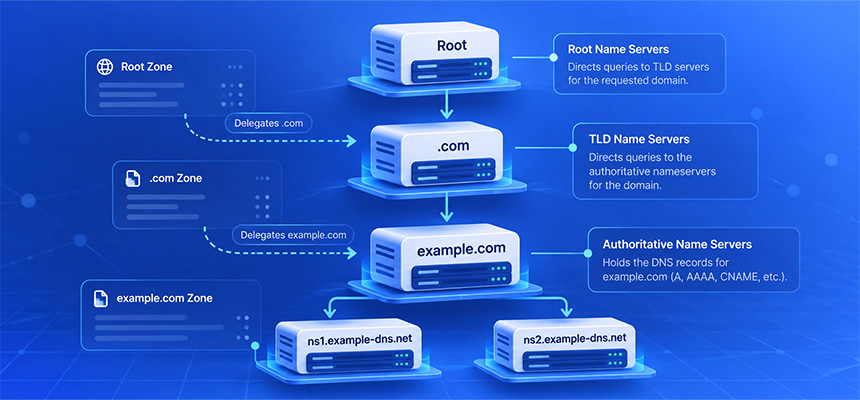
DNS delegation is the process that tells the Domain Name System which nameservers are responsible for answering authoritative DNS queries for a domain or subdomain.
For example, when someone looks up:
example.com
the DNS system needs to know which nameservers have authority over that domain.
A typical delegation may point to:
ns1.example-dns.net
ns2.example-dns.net
Those nameservers then provide records such as:
A
AAAA
MX
TXT
CNAME
NS
Delegation is one of the core mechanisms that allows DNS to operate as a distributed global system rather than relying on one central database.
What Does DNS Delegation Mean?
DNS delegation means assigning responsibility for a DNS zone to one or more authoritative nameservers.
A simplified structure looks like this:
.com
  |
  v
example.com
  |
  v
Authoritative nameservers
The parent zone does not normally store every DNS record for the child domain.
Instead, it stores information indicating where authoritative answers can be obtained.
This relationship is called delegation.
What Is a DNS Zone?
A DNS zone is an administratively managed portion of the DNS namespace.
For example:
example.com
may be managed as one DNS zone.
That zone can contain records such as:
example.com.        IN A     192.0.2.10
www.example.com.    IN A     192.0.2.10
mail.example.com.   IN A     192.0.2.20
example.com.        IN MX 10 mail.example.com.
The organization or DNS provider operating the authoritative nameservers controls the contents of that zone.
What Is an Authoritative Nameserver?
An authoritative nameserver is a DNS server that provides definitive answers for records within a DNS zone it is responsible for.
For example:
ns1.example-dns.net
ns2.example-dns.net
may be authoritative for:
example.com
If a resolver asks:
What is the A record for www.example.com?
the authoritative nameserver can answer from the configured zone data.
Authoritative Nameserver vs Recursive Resolver
These are different parts of DNS.
Recursive resolver
A recursive resolver searches the DNS hierarchy on behalf of a client.
Common users of recursive resolvers include:
- Web browsers
- Operating systems
- Mobile devices
- Applications
Authoritative nameserver
An authoritative nameserver stores and answers for DNS zones it controls.
A simplified lookup looks like:
User
  |
  v
Recursive Resolver
  |
  v
DNS Hierarchy
  |
  v
Authoritative Nameserver
  |
  v
Final DNS Answer
How Does DNS Delegation Work?
Suppose a user wants to resolve:
www.example.com
The resolver may begin at the DNS root.
A simplified sequence is:
Root nameserver
      |
      v
.com nameserver
      |
      v
example.com authoritative nameserver
      |
      v
www.example.com A record
Each stage tells the resolver where to go next.
The delegation from .com to example.com is what allows the resolver to reach the correct authoritative nameservers.
What Is a Parent Zone?
The parent zone is the DNS zone immediately above another zone in the hierarchy.
For:
example.com
the parent is:
.com
For:
dev.example.com
the parent may be:
example.com
if dev.example.com has been delegated as a separate DNS zone.
What Is a Child Zone?
A child zone is a delegated DNS zone below a parent.
For example:
example.com
    |
    v
dev.example.com
If dev.example.com is delegated to separate nameservers, it becomes a child zone with independent authoritative DNS management.
What Records Create a DNS Delegation?
Delegation is primarily represented by NS records in the parent zone.
For example:
example.com. IN NS ns1.example-dns.net.
example.com. IN NS ns2.example-dns.net.
These records tell resolvers that the listed nameservers are responsible for the child zone.
What Is an NS Record?
NS stands for:
Name Server
An NS record identifies a nameserver authoritative for a DNS zone.
A zone usually has more than one authoritative nameserver for redundancy.
For example:
example.com. IN NS ns1.example-dns.net.
example.com. IN NS ns2.example-dns.net.
Why Are Multiple Nameservers Used?
Using multiple authoritative nameservers improves resilience.
If one nameserver is unavailable, another may still answer queries.
For example:
ns1.example-dns.net → Available
ns2.example-dns.net → Available
If one experiences an outage:
ns1.example-dns.net → Offline
ns2.example-dns.net → Available
DNS resolution may continue through the remaining server.
Registrar Nameservers vs DNS Zone NS Records
This distinction is important.
When you configure nameservers at the domain registrar, you are usually changing the delegation stored at the parent registry level.
For example:
Registrar configuration:

ns1.example-dns.net
ns2.example-dns.net
Inside the DNS zone itself, you may also see:
example.com. IN NS ns1.example-dns.net.
example.com. IN NS ns2.example-dns.net.
Ideally, the intended delegation and authoritative zone configuration should be consistent.
What Happens If Parent and Child NS Records Do Not Match?
A mismatch can create confusing DNS behavior.
For example, the parent zone may delegate to:
ns1.old-provider.net
ns2.old-provider.net
while the zone itself says:
ns1.new-provider.net
ns2.new-provider.net
Resolvers begin with the parent delegation, so the parent information is critical.
If the old nameservers no longer serve the zone correctly, DNS resolution may fail.
What Is a Lame Delegation?
A lame delegation occurs when a parent zone delegates a DNS zone to a nameserver that is not actually authoritative for that zone.
For example:
Parent says:

example.com → ns1.example-dns.net
but when queried:
ns1.example-dns.net
does not have authoritative data for:
example.com
This is a delegation error.
What Causes a Lame Delegation?
Common causes include:
- Nameservers changed at the registrar before the new DNS zone was created.
- The DNS provider removed the zone.
- An incorrect nameserver hostname was entered.
- One secondary nameserver was not configured correctly.
- A migration was only partially completed.
What Is a Glue Record?
A glue record is address information provided by a parent zone when it is needed to locate a child nameserver.
Consider:
example.com
Nameserver:
ns1.example.com
There is a circular dependency:
To resolve example.com,
you need ns1.example.com.

To resolve ns1.example.com,
you may need example.com's DNS.
The parent can break this dependency by providing the nameserver's IP address as glue.
Glue Record Example
A simplified parent response may contain:
example.com. IN NS ns1.example.com.

Additional information:

ns1.example.com. IN A 192.0.2.53
The resolver can now contact:
192.0.2.53
without first needing the child zone to resolve the nameserver hostname.
When Are Glue Records Required?
Glue is especially important when a nameserver hostname exists inside the same delegated namespace.
For example:
Domain:
example.com

Nameserver:
ns1.example.com
This is often called an in-bailiwick nameserver relationship.
Are Glue Records Always Required?
No.
If:
example.com
uses:
ns1.external-dns.net
the resolver can resolve ns1.external-dns.net independently through the DNS hierarchy.
Glue for the child domain is not needed in the same way.
What Is an In-Bailiwick Nameserver?
An in-bailiwick nameserver has a hostname within the domain being delegated.
Example:
Domain:
example.com

Nameserver:
ns1.example.com
An out-of-bailiwick nameserver would be:
ns1.dns-provider.net
Why Glue Record Problems Break DNS
If required glue is missing or points to an incorrect IP address, resolvers may be unable to reach the authoritative nameserver.
For example:
Parent glue:
ns1.example.com → 192.0.2.10

Actual DNS server:
ns1.example.com → 198.51.100.20
If the old address no longer runs the authoritative service, queries may fail.
What Is DNS Delegation Check?
A DNS delegation check examines whether the parent and child DNS configuration is consistent and reachable.
Useful checks include:
- Which nameservers the parent delegates to
- Whether those nameservers answer authoritatively
- Whether glue records are present when required
- Whether nameserver addresses are reachable
- Whether NS records are consistent
- Whether DNSSEC delegation is valid
Why DNS Delegation Problems Matter
A domain can have perfectly correct records inside its DNS provider's dashboard and still fail publicly if delegation is wrong.
For example:
DNS provider zone:
Correct

Registrar nameservers:
Incorrect

Result:
Users never reach the correct DNS provider
This is why checking only the DNS zone is sometimes insufficient.
DNS Delegation vs DNS Propagation
These concepts are related but different.
Delegation
Determines which authoritative nameservers are responsible for the zone.
Propagation
Describes the period during which cached DNS information across recursive resolvers may still reflect an older configuration.
If delegation itself is wrong, waiting for propagation will not fix the configuration.
Why “Wait for DNS Propagation” Is Not Always the Answer
DNS changes do need time for cached data to expire.
However, many DNS problems blamed on propagation are actually configuration errors.
Examples include:
- Wrong nameservers at the registrar
- Missing DNS zone
- Lame delegation
- Incorrect glue records
- Broken DNSSEC
If a configuration is wrong, waiting longer usually changes nothing.
How a Nameserver Change Works
Suppose a domain currently uses:
ns1.old-provider.net
ns2.old-provider.net
and you want to move to:
ns1.new-provider.net
ns2.new-provider.net
A safe migration process is:
- Create the DNS zone at the new provider.
- Copy all required DNS records.
- Verify the new nameservers answer correctly.
- Change the domain's nameservers at the registrar.
- Keep the old DNS zone available during the transition.
- Monitor DNS responses.
Why You Should Configure the New DNS Provider First
If you change delegation before creating the zone at the new provider, resolvers may reach nameservers that do not know anything about the domain.
The result can be:
SERVFAIL
or missing DNS answers.
Prepare the destination before switching delegation.
Why the Old DNS Zone Should Remain Online Temporarily
Recursive DNS resolvers may still have cached NS information pointing to the previous provider.
During the transition:
Resolver A → old DNS provider
Resolver B → new DNS provider
If both providers contain equivalent zone data, users are less likely to experience disruption.
How Long Does a Nameserver Change Take?
There is no universal fixed time.
The observed transition depends on:
- Cached NS records
- TTL values
- Registry update timing
- Recursive resolver behavior
Some resolvers may observe the new delegation quickly while others continue using cached information until it expires.
Can Nameserver Changes Break Email?
Yes.
If the new DNS zone is missing email-related records, mail delivery can fail.
Before changing nameservers, copy records such as:
MX
TXT
A
AAAA
CNAME
including:
- SPF
- DKIM
- DMARC
- Mail server addresses
Can Nameserver Changes Break SSL Certificates?
They can indirectly.
If DNS starts pointing users to the wrong server or domain-control validation records disappear, HTTPS or certificate renewal can fail.
For example, an ACME DNS validation record may be missing after migration:
_acme-challenge.example.com
This can prevent automated certificate renewal.
Can Nameserver Changes Break Subdomains?
Yes.
If the new DNS zone does not contain all existing subdomain records, hostnames may disappear.
For example:
www.example.com
api.example.com
mail.example.com
status.example.com
If only the root domain record is copied, the other services can fail.
DNS Delegation and Subdomain Delegation
A parent domain can delegate one subdomain separately.
For example:
example.com
    |
    +-- www.example.com
    +-- mail.example.com
    |
    +-- dev.example.com
           |
           v
    Separate nameservers
The parent zone may contain:
dev.example.com. IN NS ns1.dev-provider.net.
dev.example.com. IN NS ns2.dev-provider.net.
From that point, the dev.example.com zone can be managed independently.
Why Delegate a Subdomain Separately?
Possible reasons include:
- Separate technical teams
- Cloud environments
- Development infrastructure
- Regional operations
- Third-party service management
Can the Parent Zone Also Contain Records Below a Delegated Subdomain?
Once a subdomain is delegated as a separate zone, authoritative responsibility for names beneath that delegated zone moves to the child nameservers.
Administrators should avoid maintaining conflicting expectations about which zone controls those records.
What Is a Zone Cut?
A zone cut is the boundary where DNS authority moves from a parent zone to a child zone.
For example:
example.com
     |
     | Zone cut
     v
dev.example.com
NS records in the parent indicate that the child zone is managed independently.
DNS Delegation and DNSSEC
DNSSEC adds cryptographic validation to DNS.
For a signed child zone, the parent may contain a DS record referencing the child's DNSSEC key material.
A simplified trust chain is:
Root
  |
  v
TLD
  |
  v
DS record
  |
  v
Child DNSKEY
  |
  v
Signed DNS records
What Is a DS Record?
DS stands for:
Delegation Signer
A DS record exists in the parent zone and helps establish DNSSEC trust for the child zone.
For example, a registrar may submit a DS record for:
example.com
to the registry operating the parent zone.
How a Wrong DS Record Can Break DNS
If the parent contains a DS record but the child zone no longer uses the matching DNSSEC key, validating resolvers may reject the DNS response.
The result can be:
SERVFAIL
even though the underlying A or AAAA records look correct.
DNSSEC During a Nameserver Migration
DNSSEC migrations require careful planning.
If DNSSEC is active and the zone is moved to a new provider, key material may change.
Updating nameservers without coordinating DS records can create validation failures.
Before migration, determine:
- Whether DNSSEC is enabled
- Which provider manages DNSSEC keys
- Whether the DS record must change
- When old keys can safely be removed
Why Some Users Can Resolve a Domain While Others Get SERVFAIL
One possible explanation is DNSSEC validation.
A resolver that validates DNSSEC may reject a broken chain.
A non-validating resolver may still return the underlying DNS record.
This creates apparently inconsistent results.
What Does SERVFAIL Mean?
SERVFAIL indicates that a DNS server could not successfully complete the query.
Possible causes include:
- Broken DNSSEC
- Authoritative server failure
- Lame delegation
- Timeouts
- Nameserver connectivity problems
SERVFAIL does not mean the same thing as NXDOMAIN.
SERVFAIL vs NXDOMAIN
SERVFAIL
The DNS resolution process encountered a failure.
NXDOMAIN
The authoritative DNS system indicates that the queried name does not exist.
These require different troubleshooting approaches.
What Happens If One Nameserver Is Broken?
Suppose:
ns1.example-dns.net → Works
ns2.example-dns.net → Broken
Many DNS queries may still succeed because resolvers can contact the working server.
However, the configuration is not healthy.
Some users may experience slower responses or intermittent failures depending on which nameserver is queried.
Should All Authoritative Nameservers Return the Same Records?
For a normal DNS zone, authoritative nameservers should provide consistent zone data.
If:
ns1 → 192.0.2.10
ns2 → 198.51.100.20
for the same A record when no intentional DNS architecture explains the difference, investigate the zone synchronization or configuration.
What Is Zone Synchronization?
When multiple authoritative nameservers serve the same zone, they need consistent DNS data.
This may be handled by:
- Provider-managed replication
- DNS zone transfers
- API synchronization
- Configuration management systems
What Are AXFR and IXFR?
AXFR and IXFR are DNS zone transfer mechanisms.
AXFR
Transfers an entire DNS zone.
IXFR
Transfers incremental changes when supported.
These mechanisms are typically used between authorized authoritative DNS servers rather than general internet clients.
Should DNS Zone Transfers Be Public?
Normally, zone transfers should be restricted to authorized secondary DNS servers when they are used.
Allowing arbitrary public AXFR requests can expose the complete contents of a DNS zone unnecessarily.
DNS Delegation and Anycast
A single authoritative nameserver hostname may be served from many physical locations using anycast routing.
For example:
ns1.dns-provider.net
may appear as one logical nameserver while traffic is routed to nearby infrastructure around the world.
This improves resilience and latency without requiring the domain owner to configure dozens of nameserver hostnames.
Why Nameservers May Have Several IP Addresses
A nameserver hostname can have:
- Multiple IPv4 addresses
- Multiple IPv6 addresses
This can improve redundancy.
For example:
ns1.example-dns.net
A    → 192.0.2.53
AAAA → 2001:db8::53
Why IPv6 Matters for Authoritative DNS
If a nameserver publishes an AAAA record, its DNS service should work correctly over IPv6.
A broken IPv6 path can create inconsistent DNS behavior.
Check both protocols when troubleshooting authoritative nameservers.
Can a Firewall Break DNS Delegation?
Yes.
Authoritative DNS typically needs to answer queries on:
UDP 53
TCP 53
If one protocol is blocked, certain DNS queries may fail.
Allowing only UDP 53 is not a complete authoritative DNS configuration.
Why DNS Also Needs TCP Port 53
Although many DNS queries use UDP, TCP is needed in situations such as:
- Larger DNS responses
- Certain DNSSEC responses
- Zone transfers
- Fallback when UDP responses are truncated
Authoritative DNS should be tested over both UDP and TCP where appropriate.
Why a DNS Zone Works at the Provider but Not on the Internet
Suppose the DNS provider dashboard contains:
example.com → 192.0.2.10
but public lookups fail.
Possible reasons include:
- The registrar delegates to different nameservers.
- The parent delegation is outdated.
- Glue records are incorrect.
- The zone is not active on all authoritative servers.
- DNSSEC is broken.
A DNS Delegation Check is useful in this situation.
Why WHOIS Nameservers Matter
Domain registration information can help identify the nameservers assigned to a registered domain.
For example:
Name Server:
NS1.EXAMPLE-DNS.NET

Name Server:
NS2.EXAMPLE-DNS.NET
This provides useful context when comparing registration-level delegation with live DNS behavior.
Modern gTLD registration data may be retrieved through RDAP rather than legacy WHOIS services.
DNS Delegation vs Hosting
Nameservers do not necessarily host the website.
For example:
Nameservers:
DNS Provider A

A record:
192.0.2.10

Web Server:
Hosting Provider B
The DNS provider tells users where to find the website, but the hosting provider serves the actual web content.
DNS Delegation vs Registrar
The registrar is the company managing the domain registration.
The DNS provider operates the nameservers.
They may be the same company, but they do not have to be.
For example:
Registrar:
Provider A

DNS:
Provider B

Hosting:
Provider C
How to Troubleshoot DNS Delegation Problems
Step 1: Identify the intended nameservers
Determine which DNS provider should be authoritative.
Step 2: Check the registrar configuration
Confirm that the domain is delegated to the intended nameservers.
Step 3: Check the parent delegation
Verify which NS records are actually published by the parent zone.
Step 4: Resolve nameserver hostnames
Confirm that the nameservers themselves have reachable IP addresses.
Step 5: Check glue records
If the nameservers are in-bailiwick, verify the parent glue information.
Step 6: Query every authoritative nameserver
Confirm that each one answers authoritatively and consistently.
Step 7: Check UDP and TCP port 53
Ensure DNS traffic is not blocked.
Step 8: Check DNSSEC
Review DS and DNSKEY relationships if DNSSEC is enabled.
Step 9: Compare recursive resolver results
Look for cached or inconsistent responses.
Example: Wrong Nameservers at the Registrar
You create a DNS zone at:
ns1.new-dns.net
ns2.new-dns.net
but the registrar still has:
ns1.old-dns.net
ns2.old-dns.net
Editing records at the new DNS provider will have no public effect because resolvers are still being delegated to the old provider.
Example: Missing Zone at the New Provider
You update the registrar to:
ns1.new-dns.net
ns2.new-dns.net
but forget to create:
example.com
at the new provider.
The nameservers exist, but they are not authoritative for the domain.
This produces a lame or broken delegation.
Example: Incorrect Glue After Changing a Nameserver IP
Suppose:
ns1.example.com
used to be:
192.0.2.53
and now runs at:
198.51.100.53
If parent glue still contains the old address, some resolvers may contact the wrong server.
Update the registered nameserver host information where required.
Example: Broken DNSSEC After a DNS Provider Migration
The old DNS provider signs the zone using one DNSSEC key.
The new provider uses another.
The parent still contains a DS record corresponding to the old provider.
Validating resolvers see:
DS record → Old key

Child DNSKEY → New key
The trust chain fails and queries can return SERVFAIL.
Example: One Nameserver Has Old Records
Suppose:
ns1:
www.example.com → 192.0.2.10

ns2:
www.example.com → 198.51.100.20
If this difference is not intentional, users can receive inconsistent answers.
Check zone synchronization.
How DomainScan Can Help
DomainScan includes several tools useful for diagnosing delegation problems.
DNS Delegation Check
Use it to inspect the relationship between a domain and its authoritative nameservers.
Useful areas include:
- Parent delegation
- Nameserver consistency
- Nameserver reachability
- Glue information
DNS Lookup
Use it to inspect current DNS records such as:
A
AAAA
NS
MX
TXT
CNAME
DNS Propagation Check
Use it after nameserver or DNS changes to compare responses across resolvers.
Domain Whois
Use it to review available registration information and the nameservers associated with the domain.
Open Ports Lookup
Use it when checking whether a DNS server or related network service appears reachable.
A Practical DNS Delegation Checklist
- Identify the correct DNS provider.
- Confirm the DNS zone exists.
- Record the intended nameservers.
- Check registrar nameserver settings.
- Check parent NS delegation.
- Resolve all nameserver hostnames.
- Check required glue records.
- Query every authoritative nameserver.
- Compare their answers.
- Check UDP port 53.
- Check TCP port 53.
- Review DNSSEC DS records.
- Review child DNSKEY records.
- Compare results through recursive resolvers.
- Keep old DNS active during migrations when appropriate.
Frequently Asked Questions
What is DNS delegation?
DNS delegation is the process of assigning authority for a DNS zone to specific authoritative nameservers.
What is an authoritative nameserver?
It is a DNS server that provides authoritative answers for a DNS zone it is responsible for.
What is an NS record?
An NS record identifies a nameserver responsible for a DNS zone.
What is a parent DNS zone?
The parent zone is the DNS zone directly above a delegated child zone in the DNS hierarchy.
What is a child zone?
A child zone is a delegated DNS zone managed independently below its parent.
What is a glue record?
A glue record is parent-provided address information used to help resolvers locate certain child nameservers, especially in-bailiwick nameservers.
What is a lame delegation?
A lame delegation occurs when the parent points to a nameserver that is not correctly authoritative for the delegated zone.
Why does my DNS provider show the correct records but the domain does not work?
The domain may not actually be delegated to that DNS provider, or the delegation, glue, nameserver availability, or DNSSEC configuration may be incorrect.
How long does a nameserver change take?
There is no fixed universal time. Cached NS data and resolver behavior determine how long different users continue seeing previous delegation information.
Can changing nameservers break email?
Yes. If MX, SPF, DKIM, DMARC, or related DNS records are missing from the new zone, email service can be disrupted.
Can changing nameservers break a website?
Yes. Missing or incorrect A, AAAA, CNAME, or other records can make the site unreachable or send users to the wrong server.
What is a DS record?
A DS record is stored in a parent zone and helps establish the DNSSEC trust relationship with a signed child zone.
Why does DNS return SERVFAIL?
Possible causes include broken DNSSEC, authoritative server failures, timeouts, and delegation problems.
Does DNS need TCP port 53?
Yes. Authoritative DNS should support TCP as well as UDP where required by DNS operation.
How do I check DNS delegation?
Use a DNS delegation checking tool such as DomainScan DNS Delegation Check and compare parent NS records, authoritative server responses, glue information, and DNSSEC configuration.
Final Thoughts
DNS delegation is the mechanism that connects a domain to the authoritative nameservers responsible for its DNS records.
It is easy to focus only on A, MX, or TXT records, but those records are useful only if resolvers can reach the correct authoritative zone in the first place.
Many difficult DNS problems begin at the delegation layer: incorrect registrar nameservers, stale glue records, missing zones, inconsistent authoritative servers, or broken DNSSEC trust.
When troubleshooting, follow the DNS hierarchy from the outside inward. Check the parent delegation first, verify the nameserver addresses, query each authoritative server directly, and only then inspect individual zone records.
Use DomainScan DNS Delegation Check to inspect delegation health, DNS Lookup to verify the records served by the zone, DNS Propagation Check after migrations, and Domain Whois to review registration-level nameserver information.
A correct delegation creates the foundation on which every other DNS service for the domain depends.