What Is a Subdomain? How Subdomains Work and How to Find Them
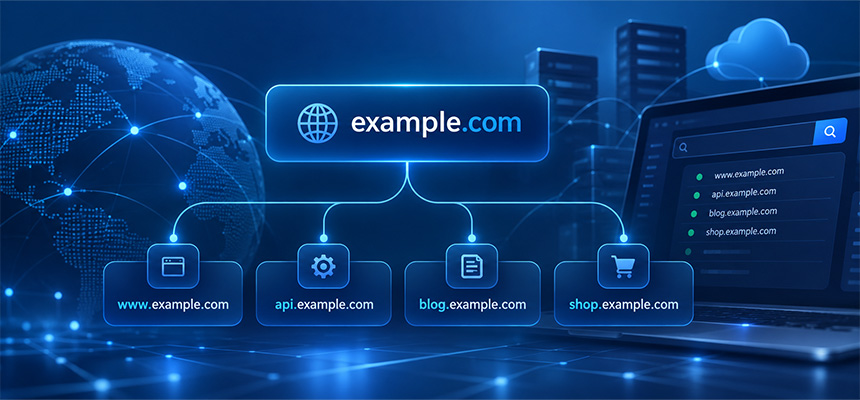
A subdomain is a hostname that exists below a parent domain in the Domain Name System.
For example:
example.com
is a domain, while:
blog.example.com
is a subdomain of example.com.
Subdomains are commonly used to separate websites, applications, APIs, support portals, email services, regional sites, and other parts of an online service.
They are not separate domains in the same sense as a completely different registered domain. Instead, they exist under the DNS namespace of the parent domain.
How Is a Subdomain Structured?
Consider:
api.example.com
The parts are:
api       → subdomain label
example   → registered domain label
.com      → top-level domain
In everyday use, people usually refer to api.example.com as a subdomain of example.com.
What Is the Root Domain?
The term root domain is commonly used informally to describe the main registered domain, such as:
example.com
This is also often called the apex domain or bare domain.
Common subdomains below it might include:
www.example.com
blog.example.com
shop.example.com
api.example.com
Is www a Subdomain?
Yes.
www.example.com is technically a subdomain of example.com.
There is nothing inherently special about the label www. It is simply a long-standing convention used for web hosting.
A website can use:
example.com
or:
www.example.com
or both.
Why Do Websites Use Subdomains?
Subdomains are useful because they let organizations separate services while keeping them under the same main domain.
For example:
www.example.com     → Main website
shop.example.com    → Online store
api.example.com     → API service
support.example.com → Support portal
status.example.com  → System status page
This creates a clear and organized structure.
Subdomains for Different Applications
A company may host different applications on different infrastructure.
For example:
www.example.com → CDN
api.example.com → Cloud API
admin.example.com → Internal admin system
files.example.com → Object storage
Each hostname can have its own DNS records and server configuration.
Subdomains for Geographic Regions
Some websites use subdomains to separate regional versions.
For example:
us.example.com
uk.example.com
sg.example.com
my.example.com
Each regional subdomain may serve localized content or route users to different infrastructure.
Subdomains for Languages
A site may also use subdomains for language-specific content:
en.example.com
fr.example.com
de.example.com
id.example.com
This is one possible multilingual architecture.
Other websites use folders instead:
example.com/en/
example.com/fr/
How Do Subdomains Work in DNS?
A subdomain works by publishing DNS records for the hostname.
For example:
blog.example.com. IN A 192.0.2.20
This tells DNS resolvers that:
blog.example.com → 192.0.2.20
The browser can then connect to that server.
Can a Subdomain Use an A Record?
Yes.
An A record points a hostname to an IPv4 address.
Example:
api.example.com. IN A 192.0.2.30
Can a Subdomain Use an AAAA Record?
Yes.
An AAAA record points a hostname to an IPv6 address.
api.example.com. IN AAAA 2001:db8::30
A subdomain can use both A and AAAA records at the same time.
Can a Subdomain Use a CNAME?
Yes.
A CNAME record creates an alias to another hostname.
For example:
shop.example.com. IN CNAME store.example-host.net.
When a resolver looks up shop.example.com, it follows the CNAME to the target hostname.
Why Are CNAME Records Common for Subdomains?
CNAME records are useful when a service is hosted by another platform.
For example:
cdn.example.com → customer.cdn-provider.net
status.example.com → service.status-provider.net
shop.example.com → ecommerce-platform.example
The external provider can change its own underlying IP addresses without requiring the customer to update the CNAME.
Can the Root Domain Use a CNAME?
Traditional DNS rules make CNAME use at the zone apex more complicated because the apex also needs records such as SOA and NS.
Some DNS providers offer alternatives such as alias, ANAME, or CNAME flattening.
Subdomains do not have this same apex limitation, which is one reason CNAME records are common there.
Subdomain vs Folder
These are different structures.
Subdomain
blog.example.com
Folder
example.com/blog/
A subdomain is a separate hostname and can have independent DNS configuration.
A folder is only a path on the same hostname.
Can a Subdomain Point to a Different Server?
Yes.
For example:
example.com      → 192.0.2.10
blog.example.com → 198.51.100.20
api.example.com  → 203.0.113.30
Each hostname can point to different infrastructure.
Can a Subdomain Use a Different Hosting Provider?
Yes.
A single domain can use different providers for different subdomains.
For example:
www.example.com → Provider A
api.example.com → Provider B
cdn.example.com → Provider C
The DNS records determine where each hostname points.
Do Subdomains Need Separate SSL Certificates?
Each HTTPS hostname needs certificate coverage.
For example:
www.example.com
api.example.com
shop.example.com
can be covered by:
- Separate certificates
- A multi-domain certificate
- A wildcard certificate when appropriate
How Wildcard Certificates Work With Subdomains
A certificate for:
*.example.com
can normally cover one-level subdomains such as:
www.example.com
api.example.com
shop.example.com
It does not normally cover:
example.com
or:
api.dev.example.com
unless those names are included separately or covered by another certificate.
What Is a Nested Subdomain?
A hostname can contain several labels.
For example:
api.dev.example.com
This can be viewed as a subdomain below:
dev.example.com
which itself is below:
example.com
Can Subdomains Have Their Own DNS Zone?
Yes.
A subdomain can be delegated to another set of authoritative nameservers.
For example:
dev.example.com. IN NS ns1.dev-dns.example.
dev.example.com. IN NS ns2.dev-dns.example.
This allows another team or provider to manage DNS for the delegated subdomain independently.
Why Delegate a Subdomain?
Organizations may delegate subdomains when:
- Different teams manage different systems.
- A cloud provider manages part of the infrastructure.
- A business unit needs independent DNS control.
- A separate environment needs its own DNS zone.
Subdomain Delegation vs CNAME
These are different.
CNAME
Aliases one hostname to another hostname.
NS delegation
Delegates authority for an entire DNS subtree to another DNS zone.
For example:
dev.example.com → delegated DNS zone
can then contain:
api.dev.example.com
app.dev.example.com
db.dev.example.com
What Is a Wildcard DNS Record?
A wildcard DNS record applies to otherwise undefined names matching a pattern.
For example:
*.example.com. IN A 192.0.2.50
This may cause many undefined subdomains to resolve to:
192.0.2.50
Examples could include:
abc.example.com
test.example.com
random.example.com
provided no more specific DNS record overrides the wildcard.
Does Wildcard DNS Mean Every Subdomain Exists?
Not in the normal operational sense.
Wildcard DNS can make arbitrary hostnames return an address even though no intentionally configured application exists for each one.
This distinction matters when using subdomain discovery tools.
A hostname that resolves is not automatically evidence of a separately configured service.
What Is Subdomain Discovery?
Subdomain discovery is the process of identifying hostnames associated with a parent domain.
For example, a search for:
example.com
might find:
www.example.com
mail.example.com
api.example.com
shop.example.com
status.example.com
These hostnames can then be analyzed individually.
Why Find Subdomains?
Subdomain discovery has several legitimate uses.
- Infrastructure inventory
- DNS troubleshooting
- Asset management
- Website migration planning
- Security review
- Finding forgotten services
For organizations with many systems, knowing which hostnames are publicly visible is useful operational information.
How Do Subdomain Finder Tools Work?
A subdomain finder may use several data sources and techniques.
Possible sources include:
- DNS records
- Certificate transparency data
- Known public hostname datasets
- Search and passive discovery sources
- Previously observed DNS information
No single method guarantees a complete list.
What Is Passive Subdomain Discovery?
Passive discovery uses existing data sources rather than actively trying many possible hostname combinations against the target domain.
Examples include information previously observed in:
- Public certificate logs
- DNS datasets
- Search indexes
This can reveal hostnames without sending large numbers of direct queries to the target infrastructure.
What Is Active Subdomain Discovery?
Active discovery involves making direct DNS or network queries for candidate hostnames.
For example, checking whether:
mail.example.com
api.example.com
dev.example.com
resolve.
Active methods should be used responsibly and only in contexts where you have permission to assess the infrastructure.
Why Subdomain Finder Results Are Not Always Complete
A subdomain may not appear because:
- It is internal only.
- It is newly created.
- It has never appeared in public datasets.
- Its DNS record was recently removed.
- The discovery source has not observed it.
- Access is limited to private DNS.
A subdomain finder should therefore be treated as a discovery aid rather than a guaranteed complete inventory.
What Is Certificate Transparency?
Certificate Transparency is a system that records publicly trusted TLS certificates in append-only logs.
Because certificates can contain multiple hostnames, those logs can reveal subdomains that have previously appeared in certificates.
For example, a certificate may contain:
example.com
www.example.com
api.example.com
admin.example.com
These hostnames can become visible through certificate transparency data.
Does Certificate Transparency Reveal Every Subdomain?
No.
Only hostnames included in publicly logged certificates can appear through that source.
A hostname that:
- Does not use HTTPS
- Uses a private certificate authority
- Has never received a public certificate
may not appear there.
Can Old Subdomains Still Appear in Search Results?
Yes.
Passive discovery sources can contain historical observations.
A tool may find:
old.example.com
even though the hostname no longer resolves today.
Always verify the current DNS state before assuming a discovered hostname is still active.
How to Verify a Discovered Subdomain
After finding a hostname, check its current DNS records.
For example:
api.example.com
might return:
api.example.com. IN A 192.0.2.30
or:
api.example.com. IN CNAME api-provider.example.net.
If no record is returned, the hostname may be historical or unavailable.
How to Check Whether a Subdomain Uses HTTPS
If the hostname is intended to serve web traffic, check:
https://subdomain.example.com
and inspect its SSL/TLS certificate.
Confirm that the certificate covers the exact hostname.
Why a Subdomain Can Have an SSL Error When the Main Domain Works
Each hostname may use different infrastructure.
For example:
example.com → valid certificate
api.example.com → expired certificate
shop.example.com → hostname mismatch
A valid certificate on the main domain does not automatically secure every subdomain.
Why a Subdomain Can Resolve but Not Load
DNS resolution is only one layer.
A hostname may resolve correctly while:
- Port 443 is closed.
- Port 80 is closed.
- The web server has no virtual host for the hostname.
- The application is offline.
- A firewall blocks traffic.
Use DNS, port, and SSL checks separately.
Why a Subdomain Can Point to the Wrong Website
This often happens in shared hosting or CDN environments.
DNS may point to the correct shared IP, but the web server does not have the hostname configured.
The server may then show a default site.
For HTTPS, it may also present a default certificate.
What Is a Dangling DNS Record?
A dangling DNS record points to a resource that no longer exists or is no longer controlled by the intended account.
For example:
old-app.example.com
   ↓ CNAME
customer.old-platform.example
If the external platform resource has been deleted but the CNAME remains, the DNS record becomes stale.
This should be investigated and removed or updated.
What Is Subdomain Takeover?
Subdomain takeover is a security issue that can occur when a DNS record points to an external service that is no longer claimed by the domain owner, and the provider allows another party to claim that resource.
A simplified situation is:
blog.example.com
   ↓
CNAME
   ↓
deleted-site.external-platform.example
If another account can claim the abandoned external resource, the subdomain could potentially serve content controlled by that account.
Does Every Dangling CNAME Cause a Takeover?
No.
Whether takeover is possible depends on the external service provider and its resource-claiming behavior.
A stale DNS record is a configuration problem worth fixing, but it does not automatically prove that exploitation is possible.
How to Reduce Subdomain Takeover Risk
Useful practices include:
- Remove DNS records when external services are retired.
- Maintain an inventory of public hostnames.
- Review third-party CNAME targets periodically.
- Confirm services are still owned and active.
- Monitor unexpected DNS changes.
Why Old Subdomains Should Be Removed
Unused subdomains can create operational confusion.
They may point to:
- Old servers
- Abandoned cloud resources
- Expired certificates
- Deprecated applications
- Third-party services no longer in use
Keeping DNS clean makes infrastructure easier to manage.
Can Subdomains Have Separate Email?
Yes.
A subdomain can have its own MX records.
For example:
support.example.com. IN MX 10 mail.support.example.com.
This allows email addresses such as:
[email protected]
to use different mail infrastructure from:
[email protected]
Can Subdomains Have Their Own SPF and DKIM?
Yes.
Email authentication can be configured at subdomain level where needed.
For example:
news.example.com
may have its own SPF policy and DKIM selectors.
DMARC also supports organizational-domain and subdomain policy behavior.
Can Subdomains Have Different DNS Providers?
Yes, through delegation.
For example:
example.com → DNS Provider A

dev.example.com → DNS Provider B
This is achieved by publishing NS records for the delegated subdomain.
Why Subdomain Delegation Can Be Misconfigured
Common mistakes include:
- Missing NS records
- Nameservers that are not authoritative
- Incorrect glue records where required
- DNSSEC inconsistencies
- Different records configured at parent and child zones
Use a DNS Delegation Check when troubleshooting delegated subdomains.
Subdomain vs Second-Level Domain
These terms can be confusing because domain naming structures vary.
For:
example.com
example is commonly considered the second-level label beneath .com.
For country-code structures such as:
example.co.uk
the registrable domain structure depends on the public suffix rules.
Do not determine the registered domain simply by counting dots.
Why Public Suffix Rules Matter
Some suffixes contain multiple labels.
For example:
co.uk
A hostname such as:
shop.example.co.uk
has:
example.co.uk
as the registrable domain, while:
shop
is the subdomain label.
Do Subdomains Need Separate Registration?
No.
Once you control:
example.com
you can generally create subdomains beneath it through your DNS configuration.
You do not normally register:
blog.example.com
as a separate domain through a registrar.
Can Someone Else Register Your Subdomain?
Not through the normal public domain registration system.
The registrant controlling the parent domain controls the DNS namespace beneath it.
However, external hosting or cloud services associated with a subdomain can create security issues if their configuration is abandoned, which is why stale records should be reviewed.
Do Subdomains Affect SEO?
Search engines can crawl and index content hosted on subdomains.
Whether to use a subdomain or a folder should normally be based on the site's architecture and operational needs rather than assuming that one structure automatically guarantees better rankings.
Examples of legitimate subdomain use include:
- Separate applications
- Hosted documentation
- Support systems
- Regional platforms
Can Subdomains Be Indexed Separately?
Yes.
A publicly accessible subdomain can contain its own:
- Pages
- Robots rules
- Sitemaps
- Canonical URLs
Administrators should manage indexing intentionally.
Subdomains and Cookies
Web applications can configure cookies for a specific hostname or, in appropriate cases, for a wider domain scope.
For example, a cookie may be limited to:
app.example.com
or configured to apply more broadly across related subdomains.
Cookie scope should be kept as narrow as practical for security and application design.
Subdomains and CORS
Different subdomains are generally different origins in browser security models.
For example:
https://app.example.com
and:
https://api.example.com
are different origins.
An application may need appropriate Cross-Origin Resource Sharing configuration for browser requests between them.
Subdomains and HSTS
An HSTS policy on a parent hostname can optionally include:
includeSubDomains
This can require HTTPS for subdomains covered by the policy.
Before enabling it, confirm that all relevant subdomains support HTTPS correctly.
Subdomains and DNSSEC
A subdomain normally benefits from the DNSSEC validation chain of its parent zone when records remain in that zone.
A separately delegated child zone may have its own DNSSEC configuration.
Incorrect DS or DNSKEY relationships can cause validating resolvers to return failures.
How to Find Subdomains With DomainScan
Use DomainScan Subdomain Finder to search for publicly discoverable hostnames associated with a domain.
For example:
example.com
may return entries such as:
www.example.com
mail.example.com
api.example.com
blog.example.com
Results should then be verified with current DNS lookups.
What Should You Do After Finding a Subdomain?
For each hostname, consider checking:
- Does it still resolve?
- What A or AAAA address does it use?
- Does it use a CNAME?
- Does the service respond?
- Is HTTPS configured correctly?
- Is the certificate valid?
- Is the hostname still required?
How DomainScan Tools Work Together
Subdomain Finder
Use it to identify publicly discoverable hostnames.
DNS Lookup
Use it to inspect each hostname's current DNS records.
SSL Checker
Use it to confirm HTTPS certificate validity for web-facing subdomains.
Open Ports Lookup
Use it to investigate whether expected network services are reachable.
DNS Delegation Check
Use it when a subdomain has been delegated to separate nameservers.
Reverse IP Lookup
Use it for additional context about domains associated with a network address, while remembering that shared hosting can contain unrelated customers.
Example: Finding an Old API Subdomain
Suppose Subdomain Finder discovers:
api-old.example.com
DNS Lookup shows:
api-old.example.com
CNAME → customer.legacy-platform.example
The application has not been used for two years.
This is a good reason to review whether the DNS record should still exist.
If the external resource has been retired, remove or update the stale record.
Example: Subdomain Works Over HTTP but Not HTTPS
Suppose:
http://status.example.com → Works
https://status.example.com → Certificate error
Check:
- Certificate hostname coverage
- TLS configuration
- Port 443
- CDN configuration
- SNI virtual host
Example: Subdomain Resolves to an Old Server
Suppose the main website migrated from:
192.0.2.10
to:
198.51.100.20
but:
files.example.com
still points to:
192.0.2.10
This may be intentional, or it may be an overlooked migration record.
Inventorying subdomains helps identify such inconsistencies.
Example: Different IPv4 and IPv6 Destinations
A subdomain may contain:
api.example.com. IN A    192.0.2.30
api.example.com. IN AAAA 2001:db8::50
If the IPv6 server is outdated, some users may reach different application versions depending on their network.
Check A and AAAA records separately.
Example: Wildcard DNS Creates False Positives
Suppose:
*.example.com. IN A 192.0.2.50
Now even:
random-string-123.example.com
may resolve.
A discovery tool should account for wildcard DNS so that arbitrary resolving names are not mistaken for intentionally configured subdomains.
How to Manage Subdomains Safely
Useful practices include:
- Maintain a hostname inventory.
- Remove stale DNS records.
- Document external service dependencies.
- Monitor SSL certificate expiration.
- Review delegated subdomains.
- Check both IPv4 and IPv6.
- Review wildcard DNS use.
- Audit third-party CNAME targets.
A Practical Subdomain Audit Checklist
- Identify the parent domain.
- Run a subdomain discovery check.
- Verify each hostname with DNS Lookup.
- Record A and AAAA addresses.
- Follow CNAME targets.
- Check delegated NS records.
- Identify wildcard DNS behavior.
- Check HTTPS certificates.
- Check expected ports.
- Identify abandoned services.
- Remove stale DNS records.
- Document active hostnames.
Frequently Asked Questions
What is a subdomain?
A subdomain is a hostname below a parent domain, such as blog.example.com beneath example.com.
Is www a subdomain?
Yes. www.example.com is technically a subdomain of example.com.
Do subdomains need separate registration?
No. The owner of the parent domain can generally create subdomains through DNS configuration.
Can a subdomain point to a different server?
Yes. Each subdomain can have independent A, AAAA, CNAME, and other DNS records.
Can a subdomain use a different hosting provider?
Yes. DNS can route different subdomains to completely different infrastructure providers.
Do subdomains need separate SSL certificates?
Each HTTPS hostname needs certificate coverage. This can be provided by separate, multi-domain, or suitable wildcard certificates.
Can a wildcard certificate secure every subdomain?
A certificate such as *.example.com normally covers one-level subdomains, but not the root domain or deeper names such as api.dev.example.com.
What is wildcard DNS?
Wildcard DNS uses a record such as *.example.com to provide a DNS response for otherwise undefined matching hostnames.
How can I find subdomains?
Use a subdomain discovery tool such as DomainScan Subdomain Finder and then verify discovered hostnames with current DNS lookups.
Does a subdomain finder find every subdomain?
No. Private, internal, new, or previously unobserved hostnames may not appear in public discovery sources.
What is a dangling DNS record?
It is a DNS record that still points to a resource that has been removed or is no longer controlled as intended.
What is subdomain takeover?
It is a security issue that may occur when a subdomain points to an abandoned third-party resource that another party can claim.
Can a subdomain have its own nameservers?
Yes. A subdomain can be delegated as a separate DNS zone using NS records.
Can a subdomain have its own email system?
Yes. Subdomains can publish their own MX and email authentication records.
Final Thoughts
Subdomains are a fundamental part of DNS and modern internet infrastructure.
They allow organizations to separate websites, APIs, applications, email systems, regional services, and third-party platforms while keeping them under one main domain.
Because each subdomain can have independent DNS, hosting, TLS, and application configuration, they should be managed as real infrastructure rather than treated as simple URL prefixes.
Subdomain discovery is especially useful for finding forgotten services, migration leftovers, stale CNAME records, and infrastructure that may no longer match the current architecture.
After discovering a hostname, always verify its present state. Check its DNS records, follow aliases, inspect HTTPS certificates, and confirm that any external service it references is still active and controlled.
Use DomainScan Subdomain Finder to discover public hostnames, DNS Lookup to verify their current records, SSL Checker to inspect HTTPS configuration, and DNS Delegation Check when a subdomain is managed through separate authoritative nameservers.